The Agenda Is Not the Minutes: A Common Reading Mistake
Learn how to read a meeting agenda alongside its minutes, spot recorded decisions, and find the right local record when the agenda leaves questions.
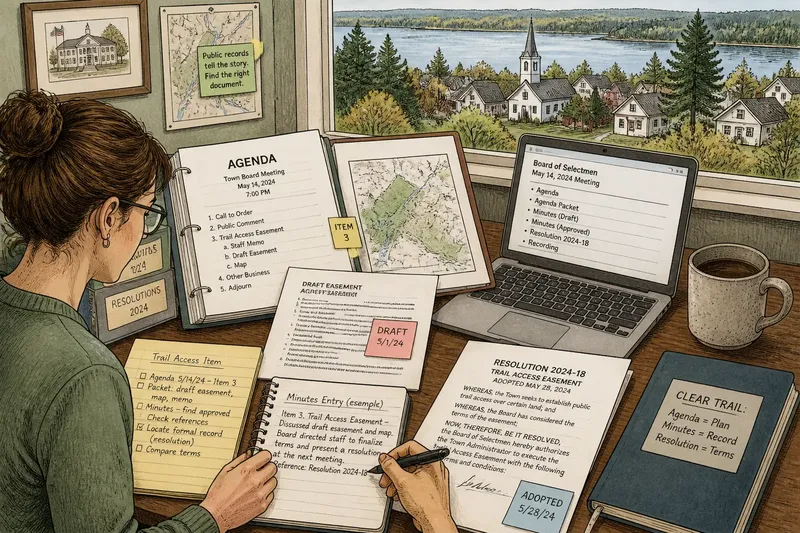
The most common agenda-reading mistake is treating a planned topic as a record of what happened. It can send neighbors away with the wrong account of a public meeting, especially when a packet includes polished drafts that look ready for approval. An agenda is a useful map of the meeting’s intended business, but it is not the meeting’s documentary footprint.
To read a local meeting record clearly, identify the right agenda, match it to the relevant minutes, and follow any document references that explain the action. The challenge is often less about interpreting official language than finding the right file among records posted under different dates, departments, or names.
Identify the right agenda
Start with the meeting date and the name of the public body: a town council, planning board, school committee, or library trustees. Check whether the agenda is labeled draft, revised, or final. A committee and a full board may address related subjects, and an updated agenda can differ from an earlier copy.
Locate the item by its title or number. Wording such as “Trail access,” “Public comment on the easement,” or “Discussion and possible action” describes the subject and the meeting’s planned scope. It does not tell you what was ultimately recorded.
Open the packet, if one is linked. Staff memos, maps, draft agreements, and proposed resolutions can provide valuable context. Keep their status clear: a draft is evidence of a document under consideration, not necessarily the version later adopted. Note the file name and agenda-item number so you can follow the same subject into related records.
Think of an agenda as a shopping list: it helps you locate what was planned, but it does not show what made it into the basket. That distinction keeps a proposed map or agreement from being mistaken for an official outcome.
Locate related records
Look on the same meeting page for “Minutes,” “Records,” or “Agendas and minutes.” Search using both the body’s name and the meeting date. Some local archives file minutes by the date they were approved rather than the date of the meeting they describe.
If the minutes are not nearby, check the municipal clerk’s page, the board archive, or the website’s search tool. Combine the body name, date, and item number. Scanned files may not support text search, so browse the meeting’s document list or ask the clerk where that body’s records are kept.
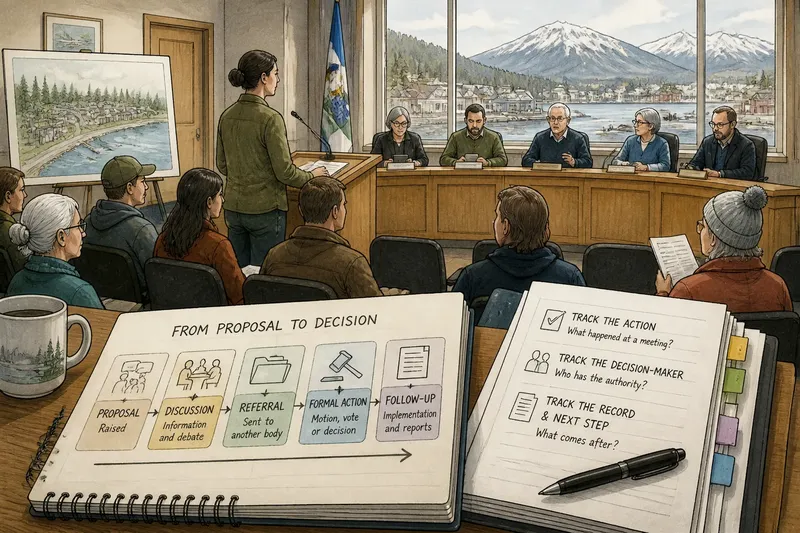
Record types answer different questions. The minutes are the body’s official account of proceedings, while an adopted resolution, ordinance, contract, or decision document may give the exact terms of a formal action. A posted recording or transcript, where available, can offer more detail about spoken discussion. The local body’s own filing practices determine what is available and how it is labeled.
Check record status
Look for a label such as “draft minutes” or “approved minutes.” Drafts may still be under review; approved minutes are the version accepted by the body, sometimes with corrections. Approval does not mean every comment or exchange appears word for word.
If the minutes have not been posted, check whether the body has scheduled their review or approval. Avoid using an agenda, notice, or packet as a substitute. If you contact the clerk, include the body name and meeting date so the request is easy to route.
A short entry may need a second document for context. If minutes refer to an attachment, follow the link and compare its title and date with the entry. If the record names an action but leaves its terms unclear, look for the referenced formal document rather than guessing from a summary.
Questions about records?
Can an agenda show what happened?
An agenda shows the business planned for a meeting, not a complete account of what occurred. Use the matching minutes and any referenced official documents to understand what the record says.
Are minutes a transcript?
Minutes are generally not word-for-word transcripts; their level of detail depends on the body’s practices. Check for a recording or transcript if you need a fuller account of what was said.
What should I do with draft minutes?
Treat a draft as provisional and check whether the body later approved a version. The approved record may incorporate corrections or otherwise differ from the draft.
Where can I find a document’s exact terms?
Follow references in the minutes to the relevant resolution, ordinance, contract, or decision document. That formal record may state details that a brief meeting entry does not include.
Keep a clear trail
Say which document supports your account. “The draft agenda lists a proposed trail easement” is more precise than saying the town approved one. If you are describing a formal action, name the record that states its terms and distinguish it from background material.
Say you are checking a fictional town board’s trail-access item. The agenda identifies the meeting date and item number; its packet contains a draft easement and a map. You search the board archive by date, open the matching minutes, and see that the entry refers to a later formal document. You then follow that reference and find a signed resolution with terms different from the draft. The resulting account can distinguish the packet’s proposal from the document that states the adopted terms, without treating either file as a substitute for the other.
For a question the posted files do not answer, ask the clerk where the relevant record is filed or how to request it. Access rules and retention practices vary, so the clerk’s local guidance is a sensible next step. When citing an agenda, minutes, or formal record, include its title and date; that small detail lets another reader retrace your path through the archive.